

Why choose Square Cloud Blob Storage?
As the largest bot hosting platform in Latin America, trusted by 80 of the 100 largest Brazilian Discord servers, we built Blob Storage to solve a problem our own community kept hitting: Discord’s CDN was never meant to be a storage backend, and links break, expire or get rate-limited. Blob Storage replaces that with an object store designed for durability. The design is simple on purpose: S3-compatible object storage is the source of truth for your files, and a global CDN delivers them from the edge. You get the 11-nines durability of an S3 design with the read latency of a global cache, and every paid plan includes a storage quota, with overage when you need more.Key features
No transfer fees
Zero ingress and egress fees. Upload and serve as much as you need: you pay for storage, never for bandwidth.
Global CDN
Public files are served from a global CDN, at the edge, close to your users wherever they are.
Private files
Store files without a public URL and hand them out through temporary links or share links. Switch any file between public and private at any time.
Share links
Links that expire, can be revoked, cap the number of downloads and, on Pro and Enterprise, ask for a password.
S3-compatible
Use aws-cli, boto3, rclone or any AWS SDK through the S3 gateway, with credentials derived from your API key.
Browser uploads
Your server mints an upload token and the browser uploads directly, without ever seeing your API key.
Rules per prefix
Set defaults (visibility, expiry, cache), limits (size, file types) and automatic deletion after N days for everything under a prefix with account settings.
Server-side operations
Copy, move and rename files without downloading them, and change headers (cache, disposition, metadata) in place.
How it works
Files come in through the REST API, the browser (with an upload token) or any S3 tool. Each file is either public or private, and goes out through a public URL, a temporary link or a share link.Storage and pricing
Storage comes with your plan, and there are no transfer fees: downloads are always free, and you only pay for storage above the included quota if you turn on overage.Included storage
Every paid plan, from Hobby to Enterprise, includes a storage quota at no extra cost, shown on the Usage page of the dashboard. The quota and the overage are measured in decimal gigabytes: 1 GB = 1,000,000,000 bytes. Blob Storage needs an active plan: there is no free plan.Previous quotas. If your plan was active when a change to the included quota was announced, you keep your previous quota for 90 days after the announcement, or until the end of the period you had already paid for, if that ends later. Lifetime plans keep the previous quota. While it lasts, it is your included quota. The Usage page of the dashboard shows the exact date for your account, and Account Stats returns it in
plan.legacy.Reaching your quota
With overage off, uploads that would go past the included quota are refused withSTORAGE_QUOTA_EXCEEDED until you free space or turn on overage. Nothing already stored is deleted, and it keeps being served normally.
Overage
Overage lets you store more than the included quota and pay only for what is above it. It is optional and off by default.- Turn it on from the Usage page of the dashboard, signed in to your account. An API key can’t turn it on.
- Set a cap in whole GB above the included quota: up to 1 TB on Standard, up to 100 TB on Pro and with no ceiling on Enterprise. The Hobby plan has no overage. Uploads can then reach the included quota plus the cap.
Storage above the included quota
R$ 0.20 per GB-month above the included quota, and R$ 0.15 for every GB-month past the first 1 TB of overage, applied automatically. Downloads stay free.
- Daily average: each day (UTC) counts what you store above the included quota, up to your cap, and each billing period is charged by the average of its days, rounded up to the next whole GB.
- Billed with your plan: overage is billed on your plan’s cycle, on the same invoice as the plan renewal. When there is no renewal to carry it, it goes on a separate usage invoice: every 30 days on plans longer than a month, once a month on lifetime plans, and when a plan ends without renewal. A usage invoice is charged to your saved card or paid by PIX.
- Minimum of R$ 10 on the usage of each invoice, counting Blob Storage and AI Gateway pay-as-you-go together. A period without usage costs nothing.
- 7 days to pay: if a usage invoice is still unpaid after 7 days, overage is paused and uploads stop at the included quota until it is paid (AI Gateway pay-as-you-go is paused too).
- Turning it off: it is refused while you store more than the included quota, so delete files first. A cap below what you already store above the quota is refused too. What you already used is still billed.
Account Stats reports your usage, this month’s daily storage, your overage settings and an estimate of this month’s overage. The Usage page of the dashboard shows the current cycle’s usage and when it closes.
Blob Storage is only available with an active plan. An account without an active plan can still list, download, delete and make files private. When a plan expires or is canceled, stored files enter a deletion queue, so renew as soon as possible: files already deleted can’t be recovered.
Features by plan
Every plan gets the full API: public and private files, temporary links, share links, the S3 gateway, upload tokens and rules per prefix. A few options depend on the plan, and all of them answer the same403 UPGRADE_REQUIRED code, with a message naming the plan (or the limit) that applies:
Public and private files
Every object is either public or private, and itsid says which: pub/<user_id>/<path> or prv/<user_id>/<path>.
- Public files have a permanent CDN URL:
https://blob.squarecloud.dev/pub/<user_id>/<path>. - Private files have no public URL (
urlisnull). You read them through a temporary link, a share link, the API or the S3 gateway.
Supported file types
Practically any file type is accepted, including formats with no registered MIME type:.bam, .vcf, .fasta, .fastq, .parquet, .h5, .npy and so on. The stored extension comes from the filename you upload, and compound compression suffixes are preserved (reads.fastq.gz stays .fastq.gz).
The only exception is a denylist of executables and installers (.exe, .msi, .bat, .apk and similar), refused with BLOCKED_FILE_TYPE.
Performance and durability
Blob Storage went through extensive benchmarks before launch. Key findings:- Latency: files are received in ~11 ms on average.
- Durability: designed for 99.999999999% (11 nines).
- Edge delivery: public files are cached at the CDN edge, so repeated reads never travel back to the origin.
- Health check:
https://blob.squarecloud.dev/pub/statusanswersOKand is never cached, so you can point your monitoring at it.
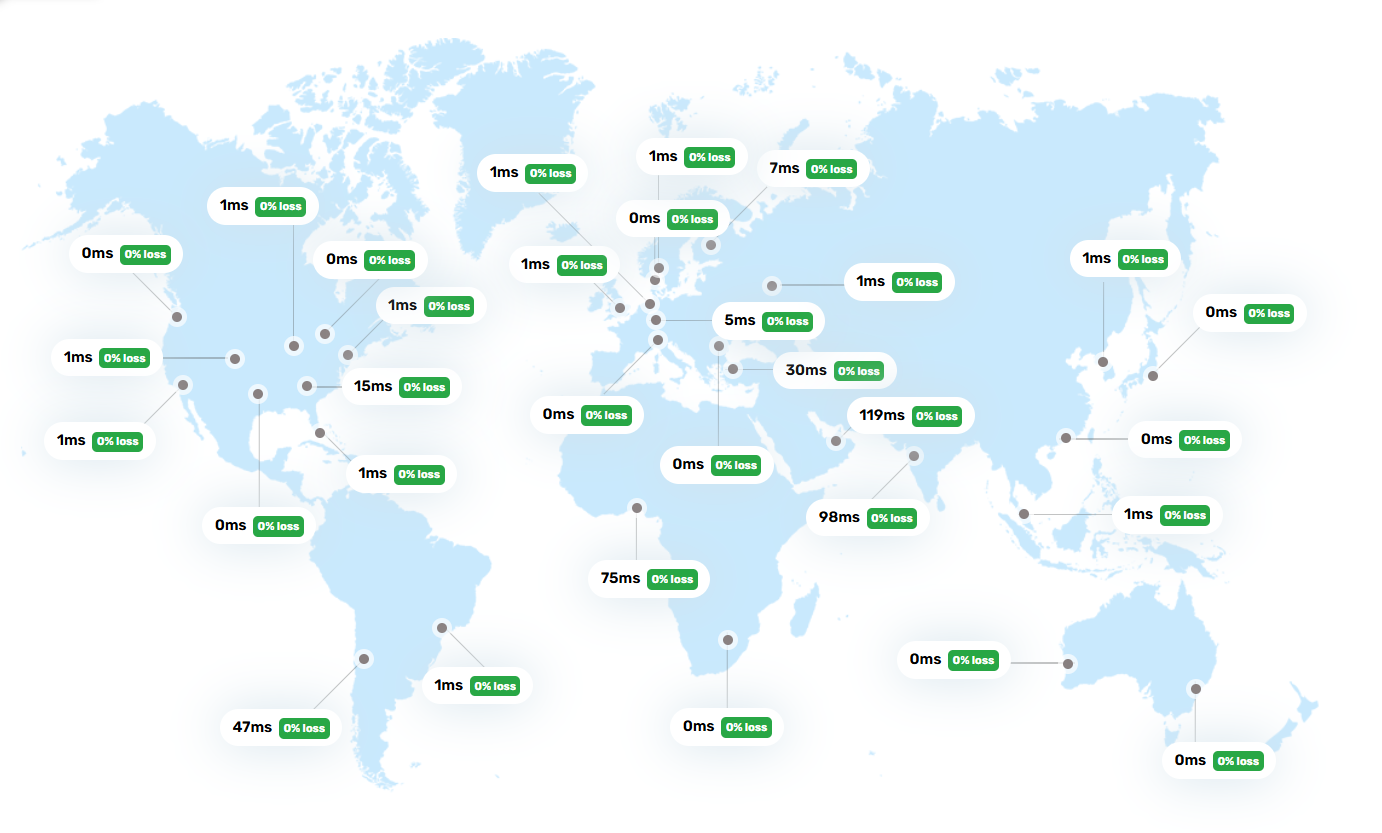
Note: Benchmark results come from controlled tests and vary with geographic location, file size, network quality and peak usage. For the most accurate numbers, test from your production environment.
How to host your files
1
Get an API key
Create an API key with the
blob:write scope in your account settings. See Authentication.2
Upload
Send files up to 100 MB to Object Post. Larger files, up to 10 GiB, go through the chunked upload flow. Prefer S3 tools? Point them at the S3 gateway instead.
3
Serve
Use the
url from the response for public files, or create a temporary link or a share link for private ones.Frequently asked questions
Which plan do I need for Blob Storage?
Which plan do I need for Blob Storage?
Any paid plan, Hobby and up. Every plan includes a storage quota, and you can turn on overage to store more. See Plans and Pricing for the full comparison.
What happens when I reach my included storage quota?
What happens when I reach my included storage quota?
With overage off, uploads that would go past the quota are refused with
STORAGE_QUOTA_EXCEEDED until you delete objects or turn on overage. Nothing already stored is deleted, and it keeps being served normally. Account Stats shows your usage and the month’s estimate at any time.Can I use S3 tools?
Can I use S3 tools?
Yes. The S3 gateway at
https://s3-blob.squarecloud.app works with aws-cli, boto3, rclone and the AWS SDKs. Get the access key pair from S3 Credentials: it is derived from your API key, so revoking the key revokes the pair.Which features depend on the plan?
Which features depend on the plan?
Every plan gets rules per prefix (5 on Hobby and Standard, 10 on Pro, 20 on Enterprise). Custom metadata and password-protected share links need Pro or Enterprise. Expiries and automatic deletion under 7 days, and files served without edge cache, need Enterprise. Outside those plans the request is refused with
403 UPGRADE_REQUIRED, and its message names the plan that unlocks the feature.